
 Backlinks Hub
Fiber media converters are the unsung heroes of modern networking, seamlessly bridging the gap between legacy copper Ethernet and high-speed fiber optic cabling. They allow businesses to extend network reach, overcome electromagnetic interference, and integrate different cable types without a complete infrastructure overhaul. However, like any piece of critical hardware, they can sometimes be the source of network headaches.
When a connection drops or performance degrades, it’s easy to blame the core switch or router. Often, the issue lies with a simple media converter. This guide will walk you through the most frequent problems encountered with these devices and provide clear, actionable steps to diagnose and resolve them, helping you keep your network running reliably.
Problem 1: The Device is Powered, But the Network Link is Down
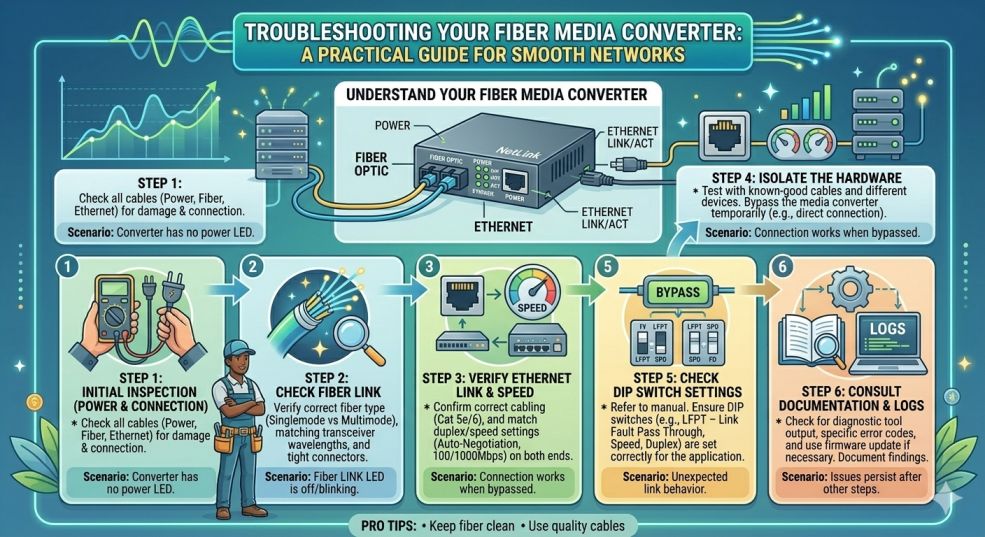
This is one of the most common scenarios. The media converter’s power LED is glowing steadily, but the “Link/Act” LED for either the copper or fiber port is dark. This indicates a physical layer connection problem.
Solutions:
- Check Your Cables and Connectors: Start with the basics. For the copper side (RJ45), ensure the Ethernet cable is securely clicked into place on both the converter and the connected device (switch, router, or PC). Try a different, known-good cable to rule out a faulty patch cord.
- Inspect the Fiber Connection: Fiber optics require clean, properly seated connections. Remove and re-seat the fiber connectors (like LC or SC) on both the converter and the patch panel or far-end device. Listen for a “click.” Gently inspect the tip of the connector with a fiberscope if available; even microscopic dust can block the signal.
- Verify Fiber Polarity: This is a classic mistake. Fiber optic transmission requires a crossover: the transmit (TX) port on one device must connect to the receive (RX) port on the other. If you are using a duplex patch cord, ensure the connector on one end connects to the opposite port on the other. Many media converters, such as QT-BIDI-0420B copper to fiber media converter, have TX and RX clearly marked near the ports.
- Match the Fiber Type: Are you using multimode fiber (usually with an orange or aqua jacket) or single-mode fiber (typically yellow)? The media converter’s optical port (or its SFP module) is designed for one type. Using the wrong combination will usually prevent a link from being established.
Problem 2: Intermittent Connectivity and Packet Loss
An unstable connection, where the network works for a while and then slows to a crawl or drops out, is frustrating and hard to pin down. This often manifests as lag in video calls or failed file transfers.
Solutions:
- Confront the Duplex Mismatch Ghost: This is a leading cause of performance issues. If one device is set to “auto-negotiate” its speed and duplex (half or full) and the other is hard-set to, say, “100Mbps Full-Duplex,” they can miscommunicate. This leads to a high number of collisions and retransmissions. Ensure both the media converter’s RJ45 port and the connected switch port are both set to auto-negotiation. If you must use fixed settings on the switch, verify the converter’s manual to see if it can be hard-set to match.
- Examine the Physical Copper Connection: A poorly crimped RJ45 plug or a damaged cable run can cause intermittent signal loss. Check for any sharp bends, staples crushing the cable, or signs of damage. If possible, use a simple cable tester to verify the twisted pairs are correctly terminated.
- Check for Link Light Stability: Observe the fiber link LED on the converter. Is it glowing a steady green, or is it flickering erratically even when no data is being sent? An unstable link light often points to a weak optical signal, which brings us to the next problem.
Problem 3: Weak Optical Signal and Attenuation
Even if a link is established, if the light signal arriving at the media converter is too weak, it will cause errors and intermittent failures. This is common over longer distances or due to poor connections.
Solutions:
- Understand Your Power Budget: Every fiber optic link has a “power budget”—the difference between the transmitter’s output power and the receiver’s minimum required power (its sensitivity). Factors like distance, the number of connectors, and splices all eat into this budget (a loss called “attenuation”).
- Measure with an Optical Power Meter: The most definitive way to check is with an optical power meter. Disconnect the fiber from the media converter and plug it into the meter. The reading should be within the receiver’s specified range (often listed in the converter’s manual as something like “-3 dBm to -20 dBm”). If the signal is too weak (e.g., -25 dBm or lower), you have an attenuation problem.
- Clean All Connections: Dirty connectors are the number one cause of excessive attenuation. Use appropriate fiber cleaning tools (like one-click cleaners or lint-free wipes with isopropyl alcohol) to clean every connector in the path.
- Inspect for Cable Damage or Tight Bends: Check the fiber patch cords for tight bends (exceeding the cable’s bend radius) or any signs of crushing, which can cause signal loss.
Problem 4: The Media Converter Overheats and Fails
Media converters are often tucked away in ceilings, wiring closets, or stacked on a crowded desk. Without proper airflow, they can overheat, leading to erratic behavior, random reboots, or permanent failure.
Solutions:
- Prioritize Airflow: Do not stack media converters directly on top of each other or on top of other heat-generating equipment like modems or routers. Provide at least an inch of space on all sides for air to circulate.
- Consider the Environment: If the converter is in a non-air-conditioned space like an attic or a hot equipment shed, it may exceed its operating temperature range (typically up to 122°F or 50°C).
- Use Industrial-Grade Hardware: For challenging environments, standard commercial converters won’t suffice. You need an industrial media converter. These are built with wider temperature tolerance components (often rated from -40°C to +75°C) and usually come in a ruggedized housing designed to withstand vibration, humidity, and extreme temperatures.
By methodically checking these common problem areas—cabling, configuration, signal strength, and environment—you can quickly diagnose and fix most media converter issues. This proactive approach minimizes downtime and ensures your hybrid network performs as reliably as it was designed to.